Instrumentation | PLC | Tutorials— Click here to visit
The Day I Realized Factories Have Their Own Language
Picture this: You walk into a modern factory, and everything’s humming along perfectly.
Conveyor belts start and stop at just the right moments, robotic arms dance in perfect choreography, and machines talk to each other like old friends. It’s like watching a well-rehearsed orchestra, except instead of violins, you’ve got motors, sensors, and solenoids.
But here’s the thing—someone had to teach these machines how to dance. And that someone used a programming language that looks suspiciously like the electrical diagrams your electrician uncle scribbles on napkins. Welcome to the world of Ladder Logic, the secret sauce behind industrial automation.
What Even Is a PLC? (And Why Should You Care?)
A Programmable Logic Controller (PLC) is basically the brain of industrial automation. Think of it as a super-reliable computer that’s built to survive in places where your laptop would cry for mercy—extreme temperatures, vibrations, dust, and the occasional factory worker accidentally bumping into it with a forklift.
Unlike your gaming PC that crashes when you have too many Chrome tabs open, PLCs are the Chuck Norris of computers. They run the same program millions of times without complaining, 24/7, for years on end.
Ladder Logic: Because Sometimes Old School Is Cool
Now, you might be wondering: “Why does PLC programming look like someone drew a circuit diagram from the 1950s?”
Great question! Ladder Logic was designed to look familiar to electricians who were already experts at reading relay logic diagrams. When PLCs first hit the scene in the late 1960s (yes, they’re older than Star Wars), manufacturers wanted electricians to feel at home. Mission accomplished.
The Three-Step Tango Every PLC Does
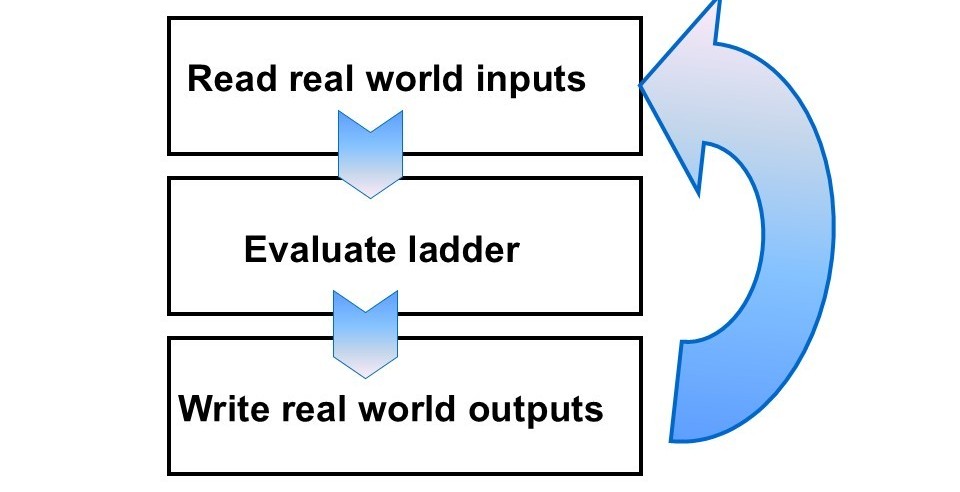
Every PLC follows this simple dance, thousands of times per second:
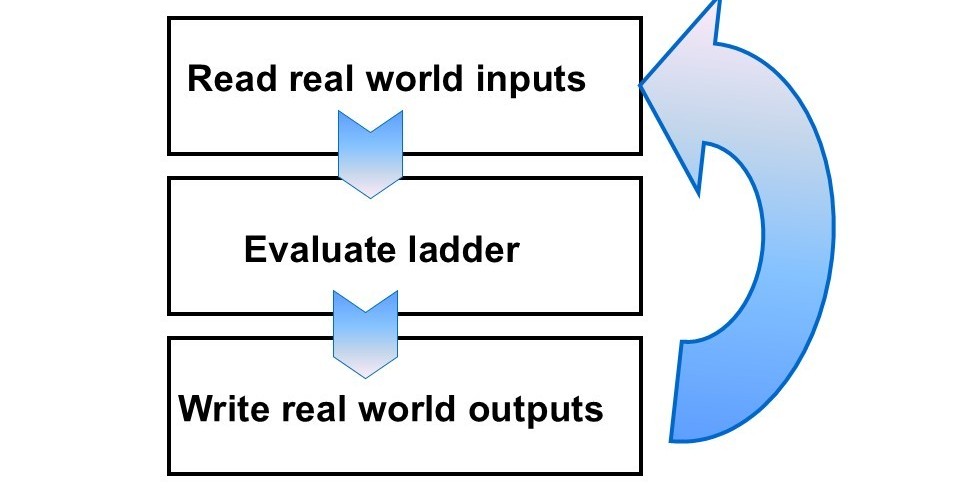
- Read real-world inputs – “Hey, is that button pressed? Is that sensor detecting something?”
- Evaluate the ladder logic – “Based on my program, what should I do?”
- Write to real-world outputs – “Okay, turn on that motor, activate that valve!”
It’s called a scan cycle, and it happens so fast you’d need slow-motion replay to catch it in action.
Let’s Talk Addresses (The PLC’s Contact List)
In the world of PLCs, everything needs an address—like how your house has a street address so the pizza guy knows where to deliver. The easy500 controller (a popular Eaton PLC) uses a simple system:
- Ixx = Inputs (like I01, I08) – These connect to real-world devices like buttons, sensors, and switches
- Qxx = Outputs (like Q01, Q04) – These control real-world stuff like motors, lights, and valves
- Mxx = Markers (like M01, M05, N11) – These are internal memory bits, like virtual relays living inside the PLC’s brain
Think of markers as imaginary switches that only exist in the PLC’s memory. They’re super useful for complex logic where you need to remember something temporarily.
The Building Blocks: Contacts and Coils
Normally Open Contacts (The “Wait for It” Switch)
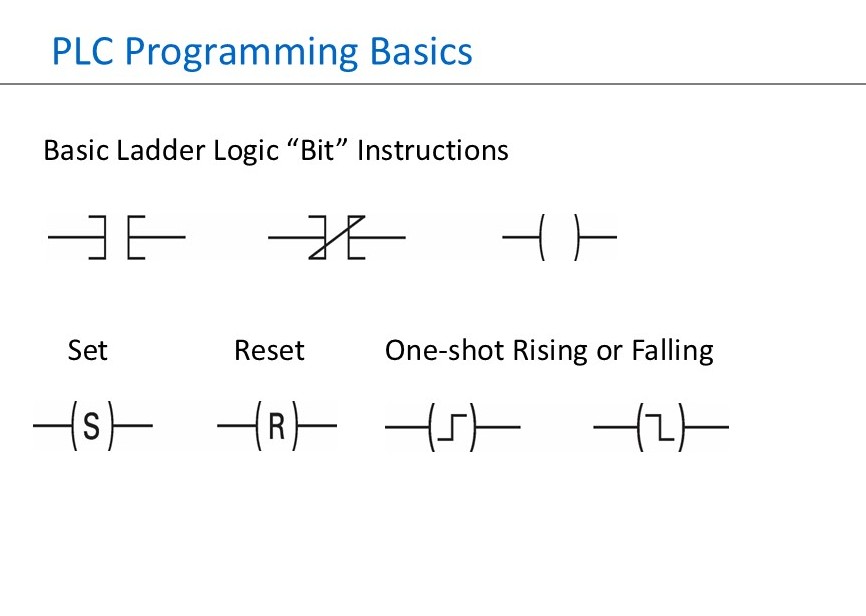
When you see a contact that looks like this: | |, it’s a normally open contact. It only lets power flow when the input is True (active).
In human terms: “If the button is pressed, THEN do something.”
We call this condition True instead of “closed” because it sounds cooler and more programmer-y. Plus, it confuses new interns, which is always fun.
Normally Closed Contacts (The Reverse Psychology Switch)
The contact that looks like this: |/| is a normally closed contact. It’s the rebel of the ladder logic world—it lets power flow when the input is False.
In human terms: “If the button is NOT pressed, THEN do something.”
This is perfect for safety circuits. For example: “If the emergency stop button is NOT pressed, allow the machine to run.”
Outputs: The Action Heroes
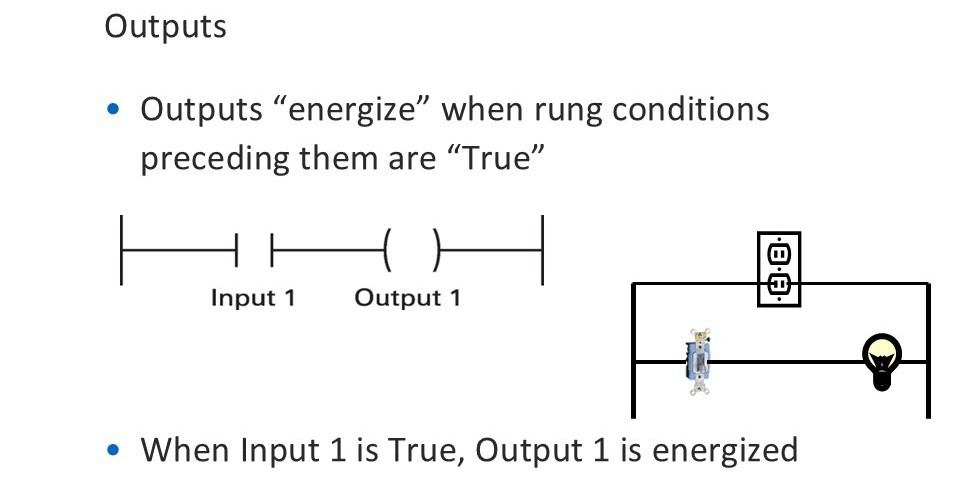
Output coils look like ( ) and they’re where stuff actually happens in the real world. When the logic leading to an output is True, the output energizes and turns on whatever device is connected to it—a motor, a light, a pneumatic valve, you name it.
Simple example: When Input 1 is True → Output 1 energizes. Boom. Your first PLC program, and you didn’t even break a sweat.
Set and Reset: The Memory Duo
Here’s where things get interesting. Sometimes you want an output to stay on even after the condition that triggered it goes away. That’s where Set and Reset instructions come in.
The Classic Start/Stop Circuit
Imagine a motor that starts with a momentary push button and stops with another button:
- Input 1 Sets Output 1 (motor starts and STAYS running)
- Input 2 Resets Output 1 (motor stops)
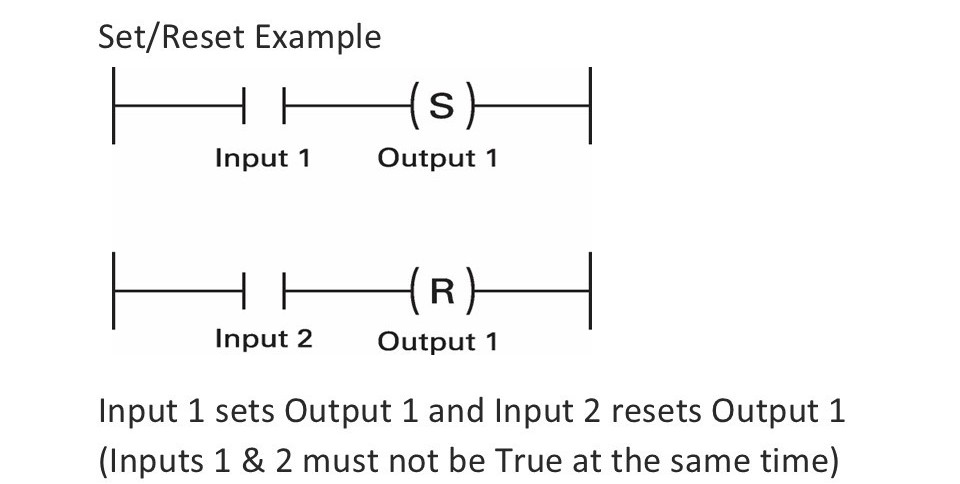
Important rule: Inputs 1 and 2 should never be True at the same time. That’s like pressing the gas and brake pedals simultaneously—confusing for everyone involved.
The Set instruction is like that friend who never forgets anything. Once you set it True, it stays True until you specifically tell it to Reset. It’s got better memory than most people after their third cup of coffee.
Logical Operations: Teaching Your PLC to Think
AND Logic (The Picky One)
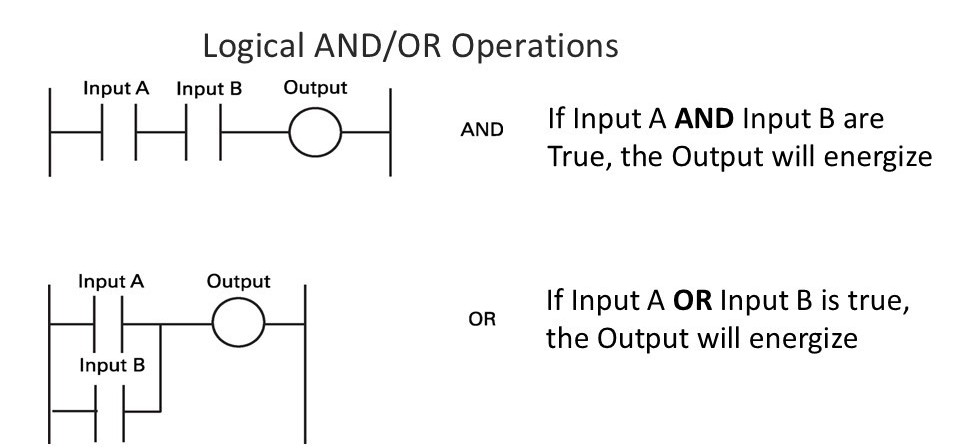
AND logic is the perfectionist of the logic world. EVERYTHING must be True for the output to energize.
If Input A AND Input B are True → Output energizesIf Input A AND Input B are True → Output energizes
Real-world example: “The machine will only start if the safety guard is closed AND the start button is pressed.” Safety first, folks.
OR Logic (The Easygoing One)
OR logic is more chill. If ANY condition is True, the output energizes.
If Input A OR Input B is True → Output energizes
Real-world example: “Sound the alarm if the high temperature sensor activates OR the high-pressure sensor activates.” Either problem is bad news.
Combination Logic (The Complex Thinker)
You can mix AND and OR logic to create sophisticated control:
Output X energizes if: Input A AND (Input B OR Input C) are True
This is where ladder logic gets powerful. You’re building decision trees that would make a flow chart jealous.
The Scan Cycle: How PLCs Read Your Mind (Sort Of)
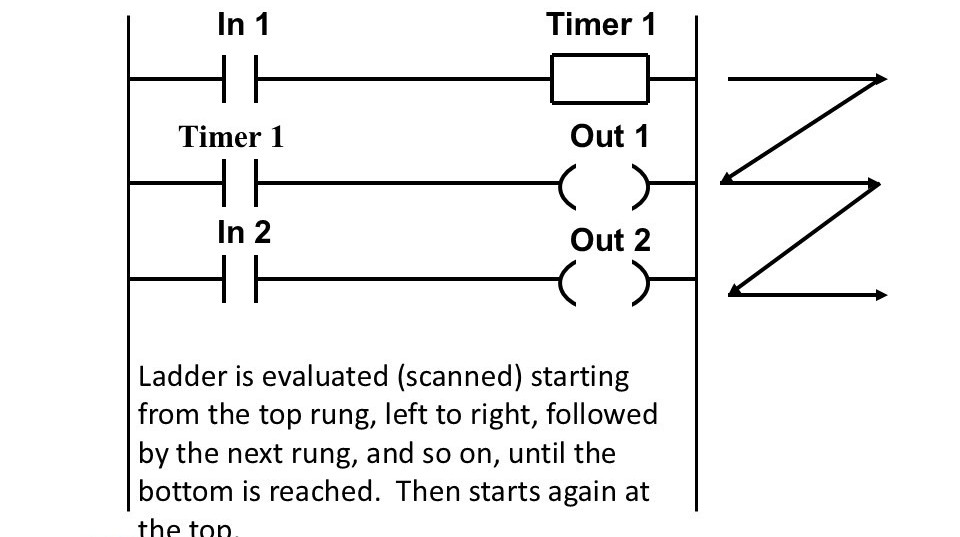
The PLC doesn’t just randomly execute your program. It follows a very methodical path, scanning from top to bottom, left to right, like reading a book. Once it hits the bottom, it immediately starts again at the top.
This matters because:
- Earlier rungs can affect later rungs in the same scan
- The order of your logic can change how your program behaves
- Understanding scan sequence prevents those “Why isn’t this working?!” moments at 3 AM
Timers: Because Timing Is Everything
PLCs have two main types of timers, and they’re absolute workhorses in industrial automation.
On-Delay Timers (The Patient Ones)
An On-Delay Timer waits patiently before doing anything. When you energize it, it starts counting. Only when it reaches its preset time does its output bit (called the “Done” bit) turn True.
Real-world use: “Wait 5 seconds after the start button is pressed before turning on the main motor.” This gives other systems time to prepare.
Technical note: The Done bit indicates the timer has completed its preset time. It’s like the timer raising its hand and saying, “Okay, I’m done counting!”
Off-Delay Timers (The Lingering Ones)
An Off-Delay Timer is the opposite. When you energize it, the Done bit turns on IMMEDIATELY. But here’s the twist: when you de-energize it, the Done bit stays True for the preset time before turning off.
Real-world use: “Keep the cooling fan running for 2 minutes after shutting down the motor.” This prevents overheating and extends equipment life.
Off-delay timers are less common than on-delay timers, but when you need one, nothing else will do the job.
Why This Matters in the Real World
Every automated system you interact with daily probably has ladder logic running behind the scenes:
- Elevators – That smooth ride? Ladder logic coordinating motors and safety sensors
- Car washes – The perfectly timed sequence of soap, rinse, and dry? Ladder logic
- HVAC systems – Your building’s climate control? Yep, ladder logic
- Manufacturing lines – From chips to cars, ladder logic keeps production flowing
The Beauty of Simplicity
What makes ladder logic brilliant isn’t complexity—it’s clarity. When a machine breaks down at 2 AM (because machines always break down at 2 AM), a technician can look at ladder logic and quickly understand what should be happening versus what’s actually happening.
It’s visual, intuitive, and proven. In an industry where downtime costs thousands of dollars per minute, that simplicity is worth its weight in gold.
Your Next Steps
Learning ladder logic opens doors to industrial automation careers, from manufacturing to utilities to building automation. It’s a skill that’s in high demand because despite all our fancy AI and cloud computing, someone still needs to program the machines that make… well, everything.
Start simple. Play with basic inputs and outputs. Add timers. Build up complexity gradually. Before you know it, you’ll be thinking in rungs and contacts.
And hey, if you can make a conveyor belt start and stop exactly when you want it to, you’re basically a factory wizard.
Pro tip: The best way to learn is hands-on. Many PLC manufacturers offer free simulator software. Download one, start clicking and dragging ladder logic elements, and watch your virtual factory come to life. Just don’t be surprised when you start seeing AND/OR logic in everyday life. (“I’ll only go to the gym if it’s not raining AND I have clean socks.” See? Ladder logic.)
Happy programming, and may your scan cycles be swift and your outputs always energize when expected! 🔧⚡